


 Qila ERP · Accounts
Financial Accounting & Controlling
Double-entry ledgers, budgets, cost and profit centres, fixed assets, bank reconciliation, cash flow and closing the books.
The platform
Every business area shares one database, so a sale updates stock, accounts and tax in the same moment, and every figure can be traced back to its source document.

Double-entry ledgers, budgets, cost and profit centres, fixed assets, bank reconciliation, cash flow and closing the books.
Items, purchasing, multi-warehouse stock with batches and serial numbers, storage bins, stock counts and stock ageing.
Quotations to sales orders, deliveries and invoices, price lists and pricing rules, credit and debit notes, POS counters and sales analysis.
Material planning, multi-level bills of materials, routings and capacity, work orders, production with scrap, product costing and variance.
Inspection plans for each item, quality inspections passed or rejected, and quality results by item.
Equipment with service intervals, maintenance orders, capacity and maintenance planning, and downtime and cost by machine.
Project plans with budget and status, timesheets, service contracts with renewals, and jobs and tasks for the team.
Multiple warehouses and bins, transfers, pick lists, packing slips and shipments, plus sales routes and beat visits.
Employees, attendance, leave with carry-forward, payroll with statutory deductions, staff advances, payslips and bank advice.
Receivables and payables, collection follow-ups, payment reminders, credit review, party statements and bank reconciliation.
Purchase requests, RFQs to several suppliers, supplier quotations, purchase approvals and supplier performance.
Leads, opportunities and the sales pipeline, activities, customer history and credit terms, follow-up tasks and notifications.
In detail
A closer look at what each business area covers. Every record links back to its source document, and every change is audited. Areas marked with a pack come with that Qila Pack.
Real-time insight
Every area opens on an overview: the numbers that matter, what is late and what needs a decision. These are real Qila screens.


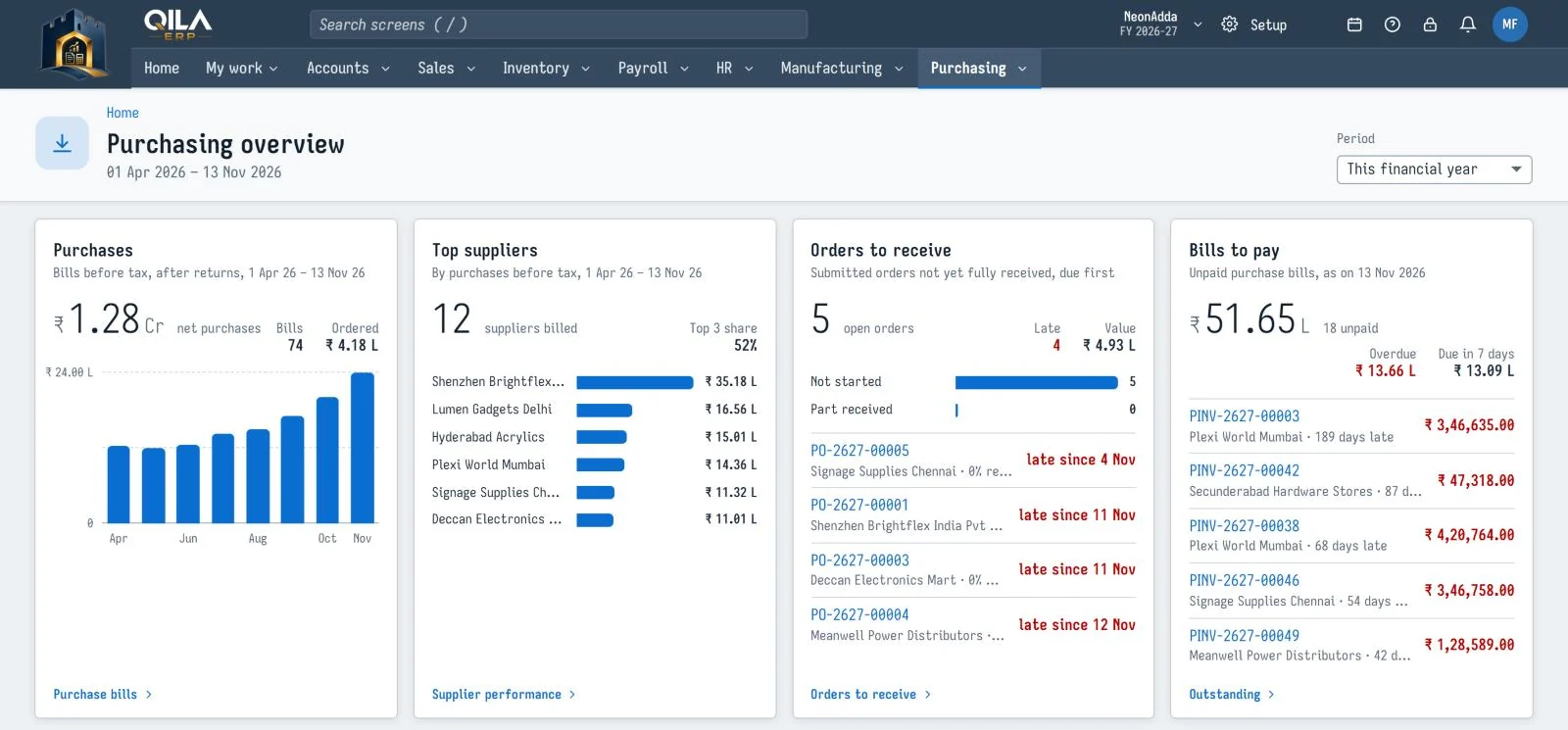

Screens from the Qila demo company. Names and figures are sample data.
Number cards and charts of any record, with filters, by role.
Columns, filters, totals and charts, grouped by financial year, quarter or month.
Reports emailed on a schedule, and alerts when a threshold is crossed.
Approvals, workflow steps and tasks in one place for each person.
Who has what open, with overdue counts, before work slips.
A live feed of what changed, and a tamper-evident trail behind it.
Governance & global reach
Approvals, permissions and an unalterable audit trail keep every transaction under control, while the same platform runs in Arabic or English, in any currency, across companies and branches.
Every change recorded. Every figure traceable. Your auditors see exactly who did what, when, and what it was before.
FAQ
Twelve business areas in one system and one database: Financial Accounting & Controlling, Materials Management, Sales & Distribution, Production Planning, Quality Management, Plant & Factory Maintenance, Project Systems, Logistics Execution & Warehouse Management, HR / Human Capital Management, Financial Supply Chain Management, Supplier Relationship Management and Customer Relationship Management. Quality and maintenance come with the Manufacturing pack, project systems with the Services pack, and sales routes with the Trading pack.
Yes. Qila has a full Arabic right-to-left interface, each person chooses their own language, print formats can be bilingual, and documents can be raised in all major currencies with exchange gain and loss.
Yes. Multiple companies and branches run in one installation. Each company keeps its own books and can use a different Qila Pack.
Yes. Qila runs in the web browser, so it works on desktops, tablets and phones. Dashboards, reports and inbox approvals are designed to be used on a phone.
Yes. Automation rules can e-mail documents as PDFs and send notifications by e-mail or WhatsApp. WhatsApp messages use your WhatsApp Business account, charged by Meta per message.
Yes. Qila has a REST API and signed webhooks for integrating with your website, e-commerce, banking or other systems.
Tax rates are configured per item and company, and tax is posted with every transaction. India GST returns, e-invoice and TDS data are built in. For other countries’ e-invoicing mandates, ask our team about the current status for your country.
Yes. The Designer builds print formats without code — with your logo, layout and fields, in English, Arabic or both on the same page.
Yes. The report builder lets you choose columns, filters, totals and charts, grouped by financial year, quarter or month. Dashboards show number cards and charts by role, and reports can be e-mailed on a schedule or trigger an alert when a threshold is crossed.
Payroll covers employees, attendance, leave, statutory deductions, payslips and bank advice. Indian PF, ESI and salary TDS files are built in. For other countries, deductions and allowances are configured for your rules during implementation — tell us your country and we will confirm what is needed.
Qila runs on your own server, so people on your office network keep working with it directly. The server itself needs an internet connection for the signed hourly licence check-in, and for anything you connect to the outside, such as e-mail, WhatsApp or e-invoicing.
No. The Designer, Workflows and Automation are no-code. Every change is held as a draft, previewed, reviewed and audited before it goes live.
Let’s talk
See Qila working with your own processes. Book a personalised demonstration with our team.